General Information
How It Works
- The API follows REST principles and is based on the JSON API specification.
- Requests must include the HTTP header
Content-Type: application/json. - API response timeout: 1 minute.
For requests with a body, pass the following header:
Content-Type: application/json
Environments
Production
https:/api/h2h/
Sandbox
https:/api/h2h/
Authentication
Access to the API uses Bearer authentication based on a JWT token, referred to below as the access token. The token must be passed in every request that requires authentication in the Authorization HTTP header.
Pass the token in every protected request:
Authorization: Bearer <access_token>
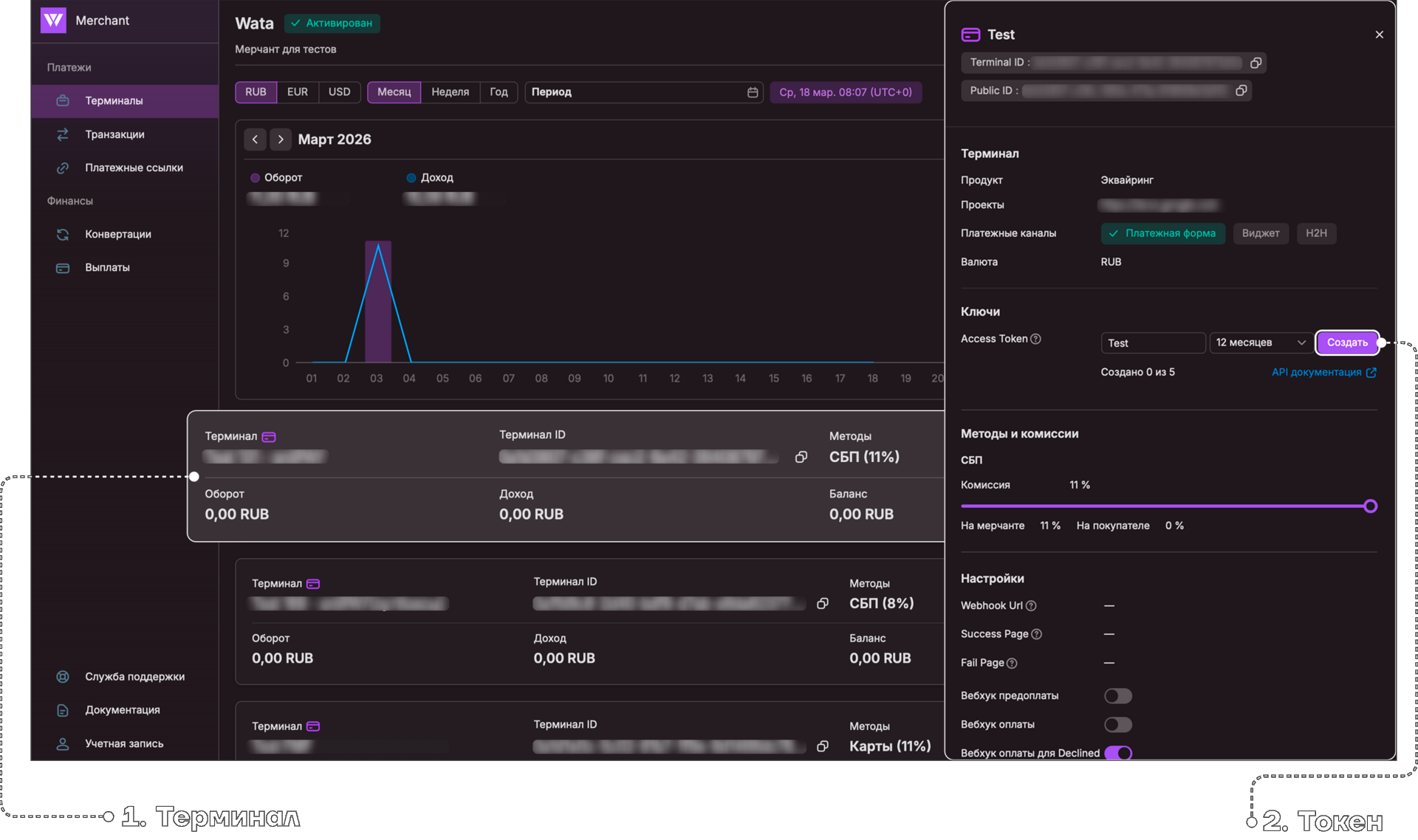
An access token can be obtained in the merchant account:
- Receive an invitation by email from your account manager.
- Follow the link in the email to set a password.
- After creating the password, sign in to the merchant account at https://merchant.wata.pro/login.
- In the 'Terminals' section, click on the terminal tile.
- A settings panel will open on the right. Create tokens there. You can create from 1 to 5 tokens and delete any you no longer need.
- Enter a name and select the token lifetime. Access token lifetimes can range from 1 to 12 months.
- After this period expires, the system returns HTTP status
401to API requests. Create a reminder so you can reissue the access token in advance and replace it in your system.
Important
- Store the access token in a secure place.
- WATA does not store access tokens in plain text.
- An existing token cannot be restored.
- Generate a new token when needed.
- Choose the access token lifetime deliberately: from 1 to 12 months.
- After the token expires, the API returns HTTP
401.
Testing
- Use the sandbox environment for testing:
https:/api/h2h/
- Sandbox merchant account:
https:/
- The sandbox environment is separate from the production environment. To gain access to the sandbox merchant account and terminal, please contact your account manager. They will request the sandbox settings on your behalf and provide you with separate credentials. Production credentials cannot be used in the sandbox.
- The process for getting a test access token is the same as in production environment.
Test Cards
| Type | Card number | Payment result |
|---|---|---|
| MIR card without 3DS | 2200 0000 2222 2222 | Success |
| MIR card without 3DS | 2203 0000 0000 0043 | Declined |
| MIR card with 3DS | 2200 0000 0000 0004 | Success |
| MIR card with 3DS | 2202 2022 0220 2200 | Declined |
| VISA card without 3DS | 4000 0000 0000 3055 | Success |
| VISA card without 3DS | 4111 1111 1111 1111 | Declined |
| VISA card with 3DS | 4242 4242 4242 4242 | Success |
| VISA card with 3DS | 4012 8888 8888 1881 | Declined |
Rate Limits
To help maintain a stable service and protect the API from excessive polling, the rate of GET requests to the API is limited. To receive status updates, rely on guaranteed webhook notifications, which can be delivered within up to 32 hours.
Only the following requests are limited
GET /api/h2h/links
GET /api/h2h/links/{id}
GET /api/h2h/v2/transactions
GET /api/h2h/transactions/{id}
GET /api/h2h/finance/balance
All other methods, such as POST and PUT, and all other endpoints are not limited.
Limit size
- 1 GET request every 30 seconds.
- The limit is counted separately for each client and each object.
How the object is determined
Links
- /links/{id} -> limit for a specific id
- /links -> general limit

Transactions
- /transactions/{id} -> limit for a specific transaction
- /v2/transactions?orderId=... -> limit for the specified orderId
- /v2/transactions -> general limit
What happens when the limit is exceeded
- HTTP 429 (Too Many Requests) is returned.
- The response indicates how many seconds to wait before repeating the request.
Recommendation
Use webhooks to receive updates. Polling requests are intended only for rare status checks or fallback scenarios.
HTTP Statuses
| Code | Meaning | Description |
|---|---|---|
| 200 | OK | The request was processed successfully |
| 400 | Bad Request | Request data is invalid. Check the request, correct the data, and send it again |
| 401 | Unauthorized | The access token was not provided or has expired. Update the access token |
| 403 | Forbidden | You do not have access to the requested endpoint |
| 429 | Too Many Requests | Try sending the request again after the interval specified in the response |
| 500 | Server Error | Contact support with a description of the issue and the request body |
When a 400 status code is returned, the response body contains error details.
Example error details response
Response 400
{
   "error":{
      "code":null,
      "message":"Your request is not valid!",
      "details":"The following errors were detected during validation - 'Amount' must be filled in.",
      "data":{

      },
      "validationErrors":[
         {
            "message":"'Amount' must be filled in.",
            "members":[
               "amount"
            ]
         }
      ]
   }
}
Error Codes
| Code | Description |
|---|---|
| Payment:PL_1001 | Invalid payment link amount. The amount is too small or too large |
| Payment:PL_1002 | Invalid payment link currency. Creating links in this currency is not allowed |
| Payment:PL_1003 | The payment link is unavailable or has already been paid |
| Payment:CRY_1001 | Card data encryption error |
| Payment:TRA_1001 | Invalid card data format when creating a transaction |
| Payment:TRA_1002 | Invalid card number when creating a transaction |
| Payment:TRA_1003 | Invalid card expiration date when creating a transaction |
| Payment:TRA_1004 | Invalid CVV value when creating a transaction |
| Payment:TRA_1005 | Invalid amount when creating a transaction |
| Payment:TRA_1006 | Invalid currency {currency} |
| Payment:TRA_1010 | Cardholder name is required |
| Payment:TRA_1011 | Payer email is required |
| Payment:TRA_1012 | The card payment system type is not supported |
| Payment:TRA_1013 | This payment method is not supported. For example, SBP payment was attempted when this method is not enabled for the terminal |
| Payment:TRA_1016 | Processing with negative balance is not configured for the terminal |
| Payment:TRA_1019 | Expected response for the pre-payment webhook was not received |
| Payment:TRA_1101 | Invalid refund amount |
| Payment:TRA_1102 | Insufficient funds on the terminal balance for refund |
| Payment:TRA_1103 | Another refund cannot be created while there are unfinished refunds for this transaction |
| Payment:TRA_2001 | This card type is not supported by the gateway |
| Payment:TRA_2002 | Insufficient funds |
| Payment:TRA_2004 | Suspected fraud |
| Payment:TRA_2006 | Issuer refused to process the online operation |
| Payment:TRA_2007 | Card is lost |
| Payment:TRA_2009 | Network refused to process the operation or the CVV code is incorrect |
| Payment:TRA_2010 | Card is not intended for online payments |
| Payment:TRA_2011 | Issuer not found |
| Payment:TRA_2012 | Refusal at the cardholder's request |
| Payment:TRA_2013 | Acquirer-side error: transaction was formed incorrectly |
| Payment:TRA_2014 | Unknown card issuer |
| Payment:TRA_2015 | Card is not intended for payments |
| Payment:TRA_2017 | Card is stolen |
| Payment:TRA_2018 | Card has expired or the expiration date is incorrect |
| Payment:TRA_2019 | Invalid PIN code |
| Payment:TRA_2020 | Card restriction |
| Payment:TRA_2021 | Transaction is not allowed for the card |
| Payment:TRA_2022 | Card amount limit exceeded |
| Payment:TRA_2023 | Card blocked due to security violations |
| Payment:TRA_2024 | Card operation limit exceeded |
| Payment:TRA_2999 | Payment cannot be processed |